IT Support Specialist Resume Example (2026)
By FindAJobAI team Updated How we built this page
IT support job ads usually list the same tools: a ticketing system, Active Directory, Windows and Mac endpoints, maybe some networking basics. What separates applicants is proof that tickets actually closed, users got back to work, and recurring problems got fixed at the root. A support resume should say how fast you worked and what stopped breaking because of you.
The example below is a support specialist with three years split between a mid-size logistics company and a managed service provider. Notice how each bullet names the ticket volume or the outage, not just the task of 'providing support'.
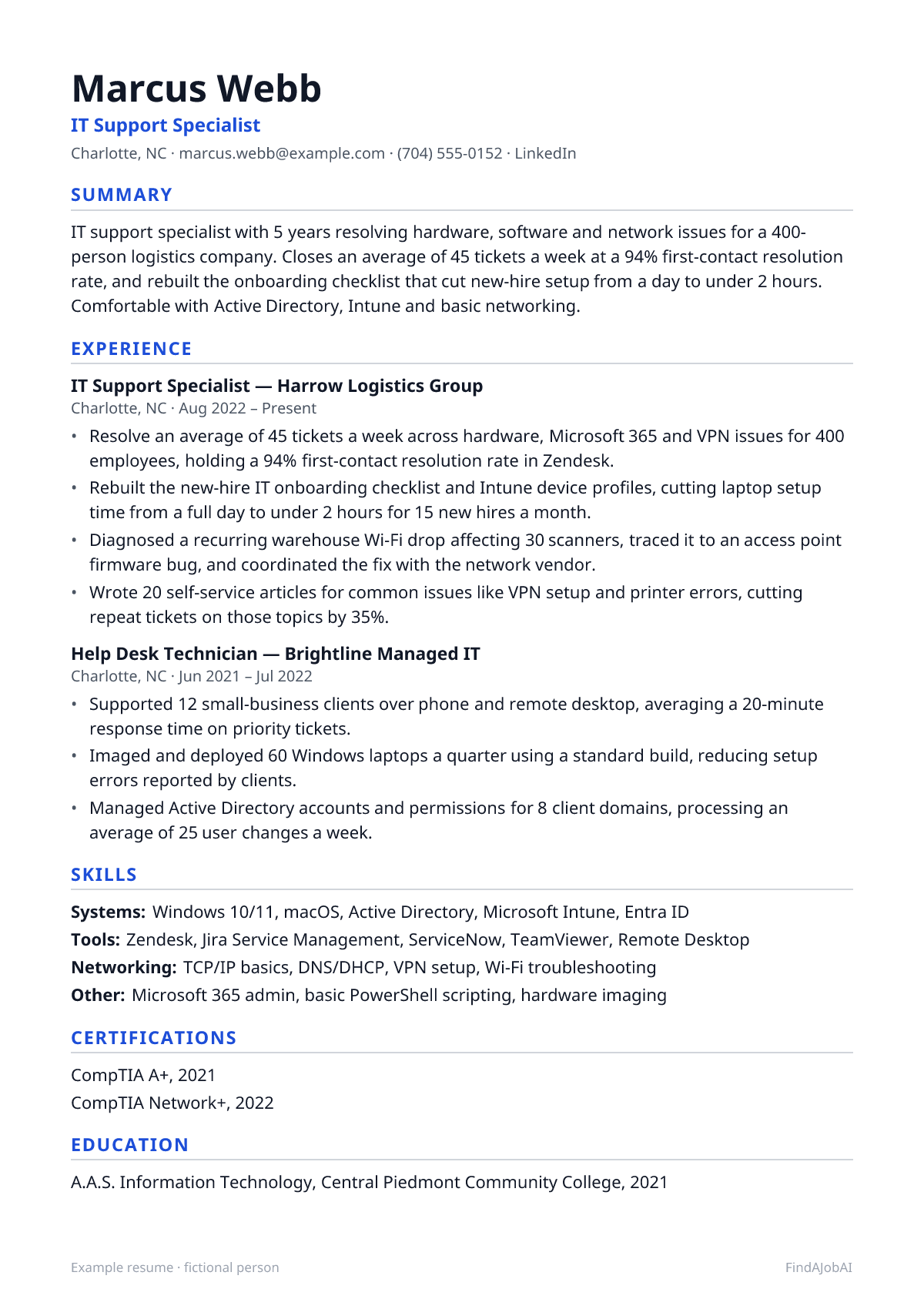
IT Support Specialist resume template
This example as a one-page template: one column, standard headings and plain text, the format applicant tracking systems read most reliably.
After you sign up, Create my CV builds your own resume in this same one-column layout, from your real experience.
Mid-level IT support specialist resume example
A complete one-page example for a fictional IT support specialist: every bullet pairs an action with what changed because of it.
Example resume · fictional person
Summary
IT support specialist with 5 years resolving hardware, software and network issues for a 400-person logistics company. Closes an average of 45 tickets a week at a 94% first-contact resolution rate, and rebuilt the onboarding checklist that cut new-hire setup from a day to under 2 hours. Comfortable with Active Directory, Intune and basic networking.
Experience
IT Support Specialist, Harrow Logistics Group
Charlotte, NC · Aug 2022 – Present
- Resolve an average of 45 tickets a week across hardware, Microsoft 365 and VPN issues for 400 employees, holding a 94% first-contact resolution rate in Zendesk.
- Rebuilt the new-hire IT onboarding checklist and Intune device profiles, cutting laptop setup time from a full day to under 2 hours for 15 new hires a month.
- Diagnosed a recurring warehouse Wi-Fi drop affecting 30 scanners, traced it to an access point firmware bug, and coordinated the fix with the network vendor.
- Wrote 20 self-service articles for common issues like VPN setup and printer errors, cutting repeat tickets on those topics by 35%.
Help Desk Technician, Brightline Managed IT
Charlotte, NC · Jun 2021 – Jul 2022
- Supported 12 small-business clients over phone and remote desktop, averaging a 20-minute response time on priority tickets.
- Imaged and deployed 60 Windows laptops a quarter using a standard build, reducing setup errors reported by clients.
- Managed Active Directory accounts and permissions for 8 client domains, processing an average of 25 user changes a week.
Skills
- Systems: Windows 10/11, macOS, Active Directory, Microsoft Intune, Entra ID
- Tools: Zendesk, Jira Service Management, ServiceNow, TeamViewer, Remote Desktop
- Networking: TCP/IP basics, DNS/DHCP, VPN setup, Wi-Fi troubleshooting
- Other: Microsoft 365 admin, basic PowerShell scripting, hardware imaging
Certifications
- CompTIA A+, 2021
- CompTIA Network+, 2022
Education
- A.A.S. Information Technology, Central Piedmont Community College, 2021
Fictional example by the FindAJobAI team: the person, employers and numbers are invented. Keep the structure; use your own work and numbers you can explain in an interview.
Entry-level IT support specialist resume example
A recent IT certificate graduate with a campus help desk internship and a home-lab project standing in for professional experience. Education sits right under the summary, and the internship bullets lean on volume and small wins rather than years on the job.
Entry-level example resume · fictional person
Destiny Carr
IT Support Specialist
Richmond, VA · [email protected] · (804) 555-0127 · LinkedIn · GitHub
Summary
Entry-level IT support specialist with CompTIA A+ certification and a semester-long help desk internship resolving login, printer and software issues for 150 students and staff. Comfortable with Windows, basic Active Directory tasks and remote desktop tools. Looking for a first full-time help desk or support role.
Education
- A.A.S. Information Technology, Piedmont Community College, 2026
Experience
IT Help Desk Intern, Piedmont Community College, IT Services
Richmond, VA · Jan 2026 – May 2026
- Resolved 20 tickets a week on average covering Wi-Fi access, printer errors and password resets for 150 students and staff.
- Reset and unlocked an average of 15 Active Directory accounts a week following a documented verification process.
- Imaged 25 lab computers with a standard Windows build ahead of the spring semester, cutting lab setup from 3 days to 1.
Campus Tech Volunteer, Piedmont Community College, Student Life
Richmond, VA · Sep 2025 – Dec 2025
- Set up projectors, laptops and video calls for 10 campus events, troubleshooting connection issues on the spot.
- Wrote a one-page guide for connecting to campus Wi-Fi, handed out at 3 orientation sessions.
Skills
- Systems: Windows 10/11, basic macOS, Active Directory (user/group management)
- Tools: Zendesk (coursework), TeamViewer, Remote Desktop, Google Workspace
- Networking: TCP/IP basics, Wi-Fi troubleshooting, printer setup
Certifications
- CompTIA A+, 2025
Projects
- Home lab help desk simulation (Windows Server, Active Directory): built a small domain with 5 virtual users to practice account lockouts, group policy and printer deployment.
- Ticket tracker rebuild (Google Sheets, Apps Script): built a simple intake form and status tracker used to log 40 practice tickets during coursework.
Senior IT support specialist resume example
A support lead eight years in, now managing a small team instead of only taking tickets. The bullets move from resolving issues to setting process, cutting resolution time across a team and leading a security rollout, and the summary names the headcount supported and the metrics owned.
Senior example resume · fictional person
Raymond Ibe
Senior IT Support Specialist
Minneapolis, MN · [email protected] · (612) 555-0184 · LinkedIn
Summary
Senior IT support specialist with 10 years in healthcare and manufacturing IT, leading a 3-person help desk team supporting 600 staff across 4 sites. Cut average ticket resolution time from 6 hours to 90 minutes and led the endpoint security rollout across 500 devices with zero missed compliance deadlines.
Experience
Senior IT Support Specialist, Lakeview Regional Health
Minneapolis, MN · Apr 2021 – Present
- Lead a team of 3 technicians supporting 600 staff across 4 clinic sites, setting ticket priority rules and weekly coverage schedules.
- Cut average ticket resolution time from 6 hours to 90 minutes by rewriting escalation rules and adding 30 self-service articles.
- Led the rollout of endpoint encryption and MFA across 500 devices for a compliance deadline, finishing 2 weeks early with no missed audits.
- Negotiated SLA terms with 2 hardware vendors, cutting average replacement laptop turnaround from 9 days to 4.
IT Support Specialist, Dunmore Manufacturing
St. Paul, MN · Jul 2018 – Mar 2021
- Resolved an average of 50 tickets a week across plant-floor terminals, office endpoints and a legacy ERP system for 350 employees.
- Standardized imaging for 200 plant-floor terminals, cutting a recurring freeze issue that had caused 15 production-line calls a month.
- Trained 4 new hires on ticketing procedures and Active Directory tasks, reducing their ramp-up time by half.
Help Desk Technician, Birchwood IT Services
St. Paul, MN · Jun 2016 – Jun 2018
- Supported 15 small-business clients over phone and remote desktop, averaging a 25-minute response on priority tickets.
- Migrated 8 client domains from on-premise file servers to Microsoft 365 with no data loss reported.
Skills
- Systems: Windows Server, Active Directory, Entra ID, Intune, macOS
- Tools: ServiceNow, Zendesk, PowerShell scripting, Jira Service Management
- Security: MFA rollout, endpoint encryption, patch management, basic compliance audits
- Leadership: Team scheduling, SLA negotiation, training and onboarding new technicians
Certifications
- CompTIA A+, 2016
- CompTIA Security+, 2020
- ITIL Foundation, 2022
Education
- A.A.S. Information Technology, Minneapolis Community and Technical College, 2016
How to write an IT support specialist resume
Five steps, in the order a recruiter reads the page. The format around them stays plain for every job: one column, standard headings, newest role first.
Header: name, target title and links
Use the title “IT Support Specialist” even if yours was Help Desk Technician or Desktop Support Analyst, and list certifications like CompTIA A+ exactly as named. Recruiters and ATS filters search for the standard title and exact certification names.
Summary: what you do and your best proof
State your ticket volume or resolution rate, the directory and device tools you use, and the size of the user base you support, then one concrete result like a process you rebuilt. Skip lines like “team player with strong communication skills”; name what you actually did instead.
Experience: newest first, a result in every bullet
Open each bullet with the scale (ticket count, device count or user count), then the tool, then the result: faster response time, fewer repeat tickets, or an outage ended. Listing daily tasks like “answered calls and emails” says little; a specific fix with its before-and-after number says a lot.
Skills: grouped, in the ad's words
Group them into systems, ticketing/support tools, networking and security. Name the exact ticketing system and directory service you used, and only list tools you have real hands-on time with, since interviewers often ask follow-up questions about them.
Education and certifications
List your degree or certificate program with the year, plus CompTIA A+, Network+ or Security+ if you hold them. Without professional experience, add a Projects section with a home-lab setup or a volunteer tech support role, each with a concrete task and outcome.
Skills to put on an IT support specialist resume
Hard skills are the tools and methods of the job; soft skills are how you work with people. Each comes with one way to prove it, because a skill named only in a list counts for little. Add the ones you really have.
Hard skills
- Ticketing systems
- Name the system you used (Zendesk, ServiceNow, Jira Service Management) and give your weekly ticket volume or resolution rate.
- Active Directory
- Mention the kind of changes you made (resets, group permissions, account creation) and roughly how many a week.
- Microsoft Intune / MDM
- Point to a device rollout or policy you configured and the number of devices or users it covered.
- Windows / macOS support
- Name both if you support both, and mention imaging or a specific recurring issue you fixed on one platform.
- Networking basics
- Describe a connectivity issue you diagnosed, naming Wi-Fi, VPN or DNS/DHCP rather than just 'networking'.
- Remote support tools
- Name the tool (TeamViewer, Remote Desktop) and the kind of issue it let you resolve without an on-site visit.
- Microsoft 365 administration
- Mention a task you handled, like mailbox setup or license management, and how many users it covered.
- Hardware imaging/deployment
- Give the device count per batch or quarter and the standard build you used.
- PowerShell or basic scripting
- Name one task you automated, like bulk account creation, and the time it saved.
- Endpoint security basics
- Mention MFA, encryption or patch management rollouts you supported, with the device or user count.
- ITIL or service management process
- If you hold the certification or follow a framework, name a process change it led to, like ticket categorization.
- Printer and peripheral support
- Mention it only inside a bullet about a specific recurring fix, not as a standalone skill line.
Soft skills
- Communication with non-technical users
- Describe explaining a fix in plain language to a frustrated user, and the outcome.
- Prioritization under ticket volume
- Give your average weekly ticket count and how you decided what to handle first.
- Patience and de-escalation
- Mention a high-pressure outage or VIP user situation you handled calmly, with the resolution time.
- Documentation habit
- Count the help articles or runbooks you wrote and the repeat tickets they prevented.
- Root-cause thinking
- Describe a recurring issue you traced to its source instead of only patching symptoms each time.
- Teamwork across IT functions
- Mention coordinating with network, security or a vendor team on a shared issue.
- Reliability
- Mention your on-call or after-hours coverage and how consistently you met response targets.
IT Support Specialist resume bullet examples: weak vs strong
The same work, written two ways. The strong version names the tool, the scope and a result; the numbers are examples, yours must be real.
Weak: Provided technical support to users.
Strong: Resolved an average of 45 tickets a week across hardware, software and network issues for 400 users at a 94% first-contact resolution rate.
Volume and resolution rate replace a vague task description.
Weak: Helped with onboarding new employees.
Strong: Rebuilt the new-hire device setup process with Intune profiles, cutting laptop configuration from a full day to under 2 hours.
Names the tool and the time saved.
Weak: Fixed network issues.
Strong: Traced a recurring Wi-Fi drop affecting 30 warehouse scanners to a firmware bug and coordinated the fix with the vendor, ending the outage.
Shows diagnosis, not just a repair.
Weak: Managed user accounts.
Strong: Processed an average of 25 Active Directory account changes a week across 8 client domains without a reported access error.
Quantifies volume and adds an accuracy result.
Weak: Created documentation.
Strong: Wrote 20 self-service help articles for common issues, cutting repeat tickets on those topics by 35%.
Ties documentation to fewer tickets, not just its existence.
Weak: Responsible for computer setup.
Strong: Imaged and deployed 60 laptops a quarter with a standardized build, reducing client-reported setup errors.
Gives a volume and a quality outcome.
15 more IT support specialist resume bullet examples
Grouped by area of the job, so you can find the ones closest to your work. Keep the shape (action, scope, result) and replace the invented numbers with your own.
Ticket resolution and response time
- Closed an average of 55 tickets a week across hardware, software and account issues for 250 employees, holding a 92% first-contact resolution rate.
- Cut average ticket response time from 4 hours to 45 minutes by introducing priority tags and an auto-routing rule in Zendesk.
- Handled after-hours on-call support for critical outages one week a month, resolving 90% of calls within 30 minutes.
- Reduced the open ticket backlog from 120 to under 20 by running a weekly triage session with the support team.
Account and access management
- Processed an average of 30 Active Directory account changes a week, including resets, group updates and new-hire provisioning, for 500 employees.
- Rolled out MFA to 400 user accounts over 6 weeks, hitting a compliance deadline with no missed enrollments.
- Audited inactive accounts quarterly and disabled 85 unused logins, closing a flagged security gap.
- Automated new-hire account creation with a PowerShell script, cutting provisioning time from 45 minutes to 5 per employee.
Hardware, imaging and deployment
- Imaged and deployed 80 laptops a quarter with a standardized build, cutting setup errors reported by new hires to near zero.
- Replaced aging desktop hardware for 60 employees over 2 months with minimal disruption, scheduling swaps around team availability.
- Diagnosed a recurring crash affecting 40 units tied to a driver conflict, and pushed the fix through Intune to all affected devices.
- Managed loaner laptop inventory of 25 units for traveling staff, tracking checkouts and cutting lost-device incidents to zero.
Documentation and process
- Wrote 25 self-service knowledge base articles covering the most common ticket categories, cutting repeat requests by 30%.
- Built a new-hire IT onboarding checklist adopted company-wide, reducing first-week setup tickets per employee from 4 to 1.
- Standardized ticket categorization across the help desk team, making monthly reporting on ticket trends possible for the first time.
IT Support Specialist resume summary examples
Two or three lines on what you do and your strongest proof. Start from the one closest to your level and use your own facts.
IT support specialist with an A.A.S. in Information Technology and CompTIA A+ certification. Completed a help desk internship resolving printer, login and software issues for 150 students and staff, plus coursework in networking and Windows Server. Comfortable with ticketing systems and remote desktop tools.
IT support specialist with 3 years supporting a 400-person logistics company, closing 45 tickets a week at a 94% first-contact resolution rate. Rebuilt the onboarding process with Intune and cut new-hire setup time by most of a day.
Senior IT support specialist with 8 years of experience leading a 3-person help desk team for a healthcare network of 600 staff. Cut average ticket resolution time from 6 hours to 90 minutes and owns the endpoint security rollout across 500 devices.
Common IT support specialist resume mistakes
Each one is easy to make and quick to fix before you apply.
Listing tools with no ticket volume or result
Naming Zendesk, Active Directory and Intune in Skills shows exposure, not impact. Pair at least one tool per bullet with a ticket count, response time or fix.
Describing tasks instead of outcomes
"Answered help desk calls" could mean anything. Say how many calls, what kind of issue, and what changed because you answered them well.
Skipping certifications or writing them vaguely
"A+ certified" should be written as "CompTIA A+" exactly, since many ATS systems and recruiters search for the precise name.
No mention of user or device scale
Support work reads very differently at 50 users versus 5,000. State how many people, sites or devices you supported so the scope is clear.
Treating every role as identical help desk work
Call out anything beyond ticket-taking, like imaging, scripting or a security rollout, since it signals readiness for a senior or specialized support role.
ATS tips for an IT support specialist resume
Applicant tracking systems turn your file into text that recruiters search, mostly for the skills and titles in the ad. They rarely reject a resume on their own; one that parses badly or misses the ad's words just doesn't come up.
- Give your ticket volume and first-contact resolution rate; support ads almost always care about both.
- Name the ticketing system, directory service and device management tool by name (Zendesk, Active Directory, Intune), not just "various tools".
- Describe one outage or recurring issue you diagnosed and fixed at the root, not only tickets you closed.
- List certifications like CompTIA A+ or Network+ near the top of Skills or Certifications; many ATS filters search for them directly.
- If you supported multiple client companies or departments, say how many and how you prioritized requests.
For the format itself, run the free ATS resume checklist.
Everything for IT Support Specialists
- IT Support Specialist cover letter examplesThree example letters and a short email version
- IT Support Specialist interview questions30 questions with sample answers
- IT Support Specialist job descriptionDuties, skills and requirements
- How to tailor your resume without lying
Other resume examples
IT Support Specialist resume FAQ
What skills should an IT support specialist put on a resume?
A ticketing system, an operating system and directory service (Windows/Active Directory or macOS), basic networking, and a device management tool like Intune. Show each one tied to a ticket volume or a fix, not just listed.
How do I get an IT support job with no experience?
A CompTIA A+ certification and a help desk internship or volunteer tech support role count as real experience. Mention any informal troubleshooting you did for family, a nonprofit or a campus lab if you have nothing else yet.
Should I list CompTIA A+ or Network+ on my resume?
Yes, list them in a Certifications section near the top of the resume. Many support job postings filter specifically for these, so they should appear as exact text, not just implied by your experience.
How long should an IT support specialist resume be?
One page for most candidates, even with a few years of experience. Keep bullets focused on ticket metrics, specific fixes and tools, and cut older or unrelated roles.
How we built this page
The FindAJobAI team wrote the three example resumes, the bullets, the skills and the advice for IT support specialist roles. The people, employers and numbers in the examples are invented; the structure, the tools and the way each bullet is built are the parts to copy.
Once we track enough live IT support specialist job ads, this page also shows the skills they ask for most, counted the same way as our in-demand skills report.
Last reviewed on November 1, 2026.