UI Designer Resume Example (2026)
By FindAJobAI team Updated How we built this page
UI designer job ads usually want proof you can turn a messy flow into something people use without thinking twice, inside a design system that scales. The portfolio link carries the visuals; the resume needs to carry the reasoning: the problem, the constraint, the decision, the result.
The example below is a UI designer with four years split between a fintech startup and a logistics company. Notice how each bullet names the surface redesigned, the tool, and what changed in how people completed a task, rather than counting screens shipped.
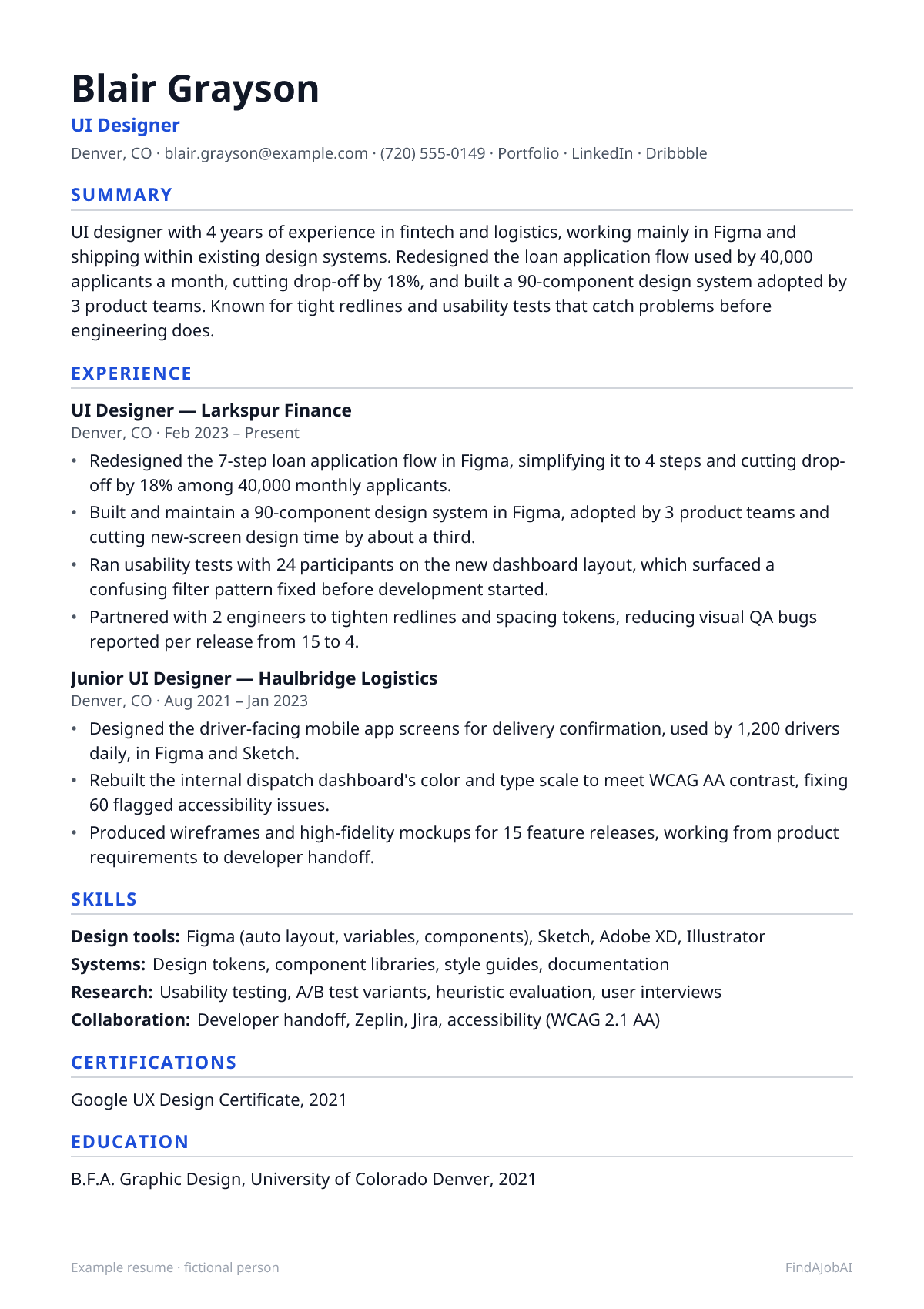
UI Designer resume template
This example as a one-page template: one column, standard headings and plain text, the format applicant tracking systems read most reliably.
After you sign up, Create my CV builds your own resume in this same one-column layout, from your real experience.
Mid-level UI designer resume example
A complete one-page example for a fictional UI designer: every bullet pairs an action with what changed because of it.
Example resume · fictional person
Blair Grayson
UI Designer
Denver, CO · [email protected] · (720) 555-0149 · Portfolio · LinkedIn · Dribbble
Summary
UI designer with 4 years of experience in fintech and logistics, working mainly in Figma and shipping within existing design systems. Redesigned the loan application flow used by 40,000 applicants a month, cutting drop-off by 18%, and built a 90-component design system adopted by 3 product teams. Known for tight redlines and usability tests that catch problems before engineering does.
Experience
UI Designer, Larkspur Finance
Denver, CO · Feb 2023 – Present
- Redesigned the 7-step loan application flow in Figma, simplifying it to 4 steps and cutting drop-off by 18% among 40,000 monthly applicants.
- Built and maintain a 90-component design system in Figma, adopted by 3 product teams and cutting new-screen design time by about a third.
- Ran usability tests with 24 participants on the new dashboard layout, which surfaced a confusing filter pattern fixed before development started.
- Partnered with 2 engineers to tighten redlines and spacing tokens, reducing visual QA bugs reported per release from 15 to 4.
Junior UI Designer, Haulbridge Logistics
Denver, CO · Aug 2021 – Jan 2023
- Designed the driver-facing mobile app screens for delivery confirmation, used by 1,200 drivers daily, in Figma and Sketch.
- Rebuilt the internal dispatch dashboard's color and type scale to meet WCAG AA contrast, fixing 60 flagged accessibility issues.
- Produced wireframes and high-fidelity mockups for 15 feature releases, working from product requirements to developer handoff.
Skills
- Design tools: Figma (auto layout, variables, components), Sketch, Adobe XD, Illustrator
- Systems: Design tokens, component libraries, style guides, documentation
- Research: Usability testing, A/B test variants, heuristic evaluation, user interviews
- Collaboration: Developer handoff, Zeplin, Jira, accessibility (WCAG 2.1 AA)
Certifications
- Google UX Design Certificate, 2021
Education
- B.F.A. Graphic Design, University of Colorado Denver, 2021
Fictional example by the FindAJobAI team: the person, employers and numbers are invented. Keep the structure; use your own work and numbers you can explain in an interview.
Entry-level UI designer resume example
A recent graphic design graduate with one internship and a self-driven app concept. Education sits right under the summary, and the project doubles as proof of a research habit she hasn't had a job to practice yet.
Entry-level example resume · fictional person
Remy Moreau
UI Designer
Richmond, VA · [email protected] · (804) 555-0166 · Portfolio · LinkedIn · Dribbble
Summary
Entry-level UI designer with a B.F.A. in Graphic Design and a summer internship redesigning a nonprofit's donation form. Comfortable in Figma with auto layout and components, and has run small usability tests on personal projects. Looking for a first full-time UI role on a product design team.
Education
- B.F.A. Graphic Design, Virginia Commonwealth University, 2026
Experience
Design Intern, Harborlight Community Fund
Richmond, VA · Jun 2026 – Aug 2026
- Redesigned the online donation form in Figma, cutting it from 6 fields to 3 visible steps and testing it with 9 past donors.
- The new form raised completed donations by 11% in a 3-week A/B test against the old version.
- Built a 20-component starter kit in Figma for the fund's volunteer sign-up pages, replacing inconsistent one-off layouts.
Freelance Designer, Self-employed
Richmond, VA · Jan 2025 – May 2026
- Designed a 12-screen Instagram and flyer refresh for a local bakery, which the owner credited with a visible rise in weekend walk-ins.
- Delivered brand and UI assets for 3 small clients, managing scope and deadlines directly with each owner.
Skills
- Design tools: Figma (auto layout, components, variables), Adobe Illustrator, Canva
- Research: Usability testing basics, user interviews, heuristic evaluation
- Fundamentals: Typography, color theory, grid systems, accessibility basics (WCAG)
Certifications
- Google UX Design Certificate, 2025
Projects
- Budgeting app concept (Figma): designed and tested a 5-screen expense tracker with 12 users, revising the add-expense flow after half missed the save button.
- Campus event finder (Figma, usability testing): prototyped a filterable event list and tested it with 8 students, cutting time-to-find-event from about 90 to 30 seconds.
Senior UI designer resume example
A lead designer nine years in, now owning a design system across multiple product surfaces. The bullets move from shipping screens to setting standards, running research as a program, and defending design decisions with numbers that reach leadership.
Senior example resume · fictional person
Wendeline Castellanos
Lead UI Designer
Minneapolis, MN · [email protected] · (612) 555-0175 · Portfolio · LinkedIn
Summary
Lead UI designer with 9 years in healthcare and consumer software, owning the design system behind 5 product surfaces used by 2 million patients. Leads a part-time research practice, mentors 3 designers, and has shipped redesigns that cut average task time across the scheduling product by 40 seconds.
Experience
Lead UI Designer, Birchwell Health
Minneapolis, MN · Apr 2021 – Present
- Own a design system of 160 components across 5 product surfaces, cutting average new-feature design time from 2 weeks to 4 days.
- Led the redesign of the appointment scheduling flow for 2 million patients, cutting average booking time from 3 minutes to 2 minutes 20 seconds.
- Mentor 3 designers on component thinking and accessibility, reviewing their files weekly and co-presenting findings to product leadership.
- Set up a lightweight usability testing program running 2 studies a month, replacing ad hoc feedback with recorded sessions and a shared findings log.
Senior UI Designer, Fernglass Media
Minneapolis, MN · Jul 2017 – Mar 2021
- Redesigned the video player and subscription upsell screens, raising trial-to-paid conversion by 6 points across 300,000 monthly trial starts.
- Built the first shared component library for the product team, adopted by 4 designers and cutting inconsistent spacing bugs reported in QA by half.
- Partnered with 5 engineers on a design-to-code handoff process using tokens, cutting visual QA review time per release from a day to 2 hours.
UI Designer, Oakridge Software
Minneapolis, MN · Jun 2015 – Jun 2017
- Designed settings and billing screens for a B2B SaaS product used by 8,000 small businesses, working from wireframe to high-fidelity mockup.
- Ran first usability tests at the company, 1 study per quarter with 6 participants, establishing a practice still used today.
Skills
- Design tools: Figma (variables, advanced auto layout), Sketch, Adobe Creative Suite
- Systems: Design tokens, component architecture, documentation, versioning
- Leadership: Mentoring designers, research program ownership, stakeholder presentations
Education
- B.F.A. Visual Communication Design, University of Minnesota, 2015
How to write an UI designer resume
Five steps, in the order a recruiter reads the page. The format around them stays plain for every job: one column, standard headings, newest role first.
Header: name, target title and links
Use the title “UI Designer” even if your title was Product Designer or Visual Designer, and lead with your portfolio link as a plain label. Recruiters search the standard title; the portfolio is where they'll actually judge the work.
Summary: what you do and your best proof
Name your main tool, the kind of product you design for, and one result: a flow you improved or a system you built, stated with a number. Skip lines like “passionate about pixel-perfect design”; every applicant claims that.
Experience: newest first, a result in every bullet
Open each bullet with the screen or flow, then the tool and the measured change: what users did differently, what shipped faster, or what defect count dropped. Listing software used says little; a usability test that changed a decision says a lot.
Skills: grouped, in the ad's words
Group them into design tools, systems and documentation, research methods, and collaboration or accessibility. Name the Figma features you actually use, and drop tools you only tried once unless the ad specifically asks for them.
Education and certifications
Put your degree and graduation year first, then any credential you hold, such as an Interaction Design Foundation course. Early in your career, add a Projects section with one or two case studies that state the problem, the test and the outcome.
Skills to put on an UI designer resume
Hard skills are the tools and methods of the job; soft skills are how you work with people. Each comes with one way to prove it, because a skill named only in a list counts for little. Add the ones you really have.
Hard skills
- Figma
- Name the specific features you use (auto layout, variables, components) next to a system or screen they sped up.
- Design systems
- Give the component count and which teams adopted it, plus the time it saved on a new screen.
- Usability testing
- State participant count and one change the test caused, not just that testing happened.
- Wireframing
- Tie wireframes to a decision between options rather than a step before the real design.
- Prototyping
- Mention the fidelity and what the prototype was used to test or pitch.
- Accessibility (WCAG)
- Give the level you target and a specific fix, like contrast or focus states, with a count.
- Design tokens
- Describe what tokens replaced, such as hardcoded colors, and the bug count it cut.
- Developer handoff
- Name the handoff tool or process and a defect metric it improved.
- Information architecture
- Show a flow you simplified by step count and the completion rate change.
- Visual design fundamentals
- Point to a specific hierarchy, contrast or spacing fix and its measured effect.
- A/B testing for design
- Name the two variants and the metric that decided the winner.
- Responsive design
- Mention the breakpoints you designed for and a usability issue fixed on mobile.
Soft skills
- Communicating design decisions
- Describe a design choice you defended to stakeholders with data, not just taste.
- Receiving feedback
- Mention a critique that changed a design and what you did with it.
- Collaboration with engineering
- Give the number of engineers you worked with and a process you set up with them.
- Prioritization
- Describe how you chose which of several usability issues to fix first and why.
- Empathy for users
- Point to a user quote or behavior from research that reshaped a screen.
- Mentoring
- Count the designers you coached and one skill they picked up from you.
- Attention to detail
- Mention an inconsistency you caught before launch, with its scope.
UI Designer resume bullet examples: weak vs strong
The same work, written two ways. The strong version names the tool, the scope and a result; the numbers are examples, yours must be real.
Weak: Designed UI for the app.
Strong: Redesigned the checkout screen's button hierarchy and form layout, lifting completed purchases on mobile by 9% in the following month.
Names the surface, the change and the measured result.
Weak: Worked in Figma.
Strong: Built 45 reusable components in Figma with variants and auto layout, cutting the time to design a new settings screen from 3 days to 1.
Turns a tool mention into a concrete system and a time saved.
Weak: Improved usability.
Strong: Moved the search bar above the fold after watching 10 users miss it in testing, raising search usage from 22% to 41% of sessions.
Shows the research, the fix and the measured behavior change.
Weak: Created wireframes.
Strong: Wireframed 3 onboarding flow options and tested them with 8 new users each, picking the version that cut time-to-first-task by 35 seconds.
Treats wireframes as a decision tool with a stated outcome.
Weak: Collaborated with developers.
Strong: Documented spacing, color and type tokens for 2 frontend engineers, cutting pixel-mismatch bugs flagged in QA from 12 to 3 per release.
Collaboration measured by a defect count, not a claim.
Weak: Ensured accessibility.
Strong: Audited 30 screens against WCAG AA contrast rules and corrected 18 that failed, clearing an external accessibility review with zero contrast flags.
Accessibility work shown with scope and a pass result.
15 more UI designer resume bullet examples
Grouped by area of the job, so you can find the ones closest to your work. Keep the shape (action, scope, result) and replace the invented numbers with your own.
Design systems and components
- Consolidated 6 inconsistent button styles into 1 component with 4 states, removing a recurring QA complaint across 3 product teams.
- Documented 40 design tokens for color and spacing, cutting the time to theme a new feature from 2 days to half a day.
- Audited the component library against 12 screens in production and retired 8 unused variants, shrinking the file by a third.
Usability research and testing
- Ran moderated usability tests with 10 users on a new navigation pattern, catching a mislabeled icon that confused 6 of 10 participants.
- Set up an unmoderated testing panel of 50 users for quick flow checks, cutting average research turnaround from 2 weeks to 3 days.
- Tested 2 pricing page layouts with 40 users each and recommended the version that raised plan-selection clicks by 14%.
- Interviewed 15 customers about a confusing settings page, which led to a 3-step simplification shipped the next quarter.
Flow and conversion redesigns
- Simplified a 5-step signup flow to 3 steps, raising completed signups by 12% among 20,000 monthly visitors.
- Redesigned the empty-state screens across 4 features, cutting first-week churn for new accounts by 5%.
- Reworked the mobile checkout layout after session recordings showed 30% of users missing the promo code field, lifting code usage by 9%.
- Rebuilt the error-state messaging across 10 forms, cutting support tickets about failed submissions by 20%.
Accessibility and handoff
- Fixed 22 contrast violations found in an accessibility audit, clearing a client's WCAG AA requirement before launch.
- Added visible focus states to 35 interactive components, closing a keyboard-navigation gap flagged by an external audit.
- Wrote developer-facing specs with spacing and state annotations for 18 screens, cutting back-and-forth handoff questions by half.
- Partnered with 4 engineers to build a shared Figma-to-code token pipeline, eliminating a recurring color-mismatch bug.
UI Designer resume summary examples
Two or three lines on what you do and your strongest proof. Start from the one closest to your level and use your own facts.
UI designer with a graphic design degree and the Google UX Design Certificate. Designed a budgeting app concept in Figma tested with 12 users, and interned redesigning a nonprofit's donation form, which raised completed donations by 11% in testing. Strong in Figma and usability testing basics.
UI designer with 4 years in fintech and logistics, working mainly in Figma inside shared design systems. Redesigned a loan application flow used by 40,000 people a month, cutting drop-off by 18%, and built a component library adopted by 3 teams.
Senior UI designer with 9 years of experience leading interface design for a healthcare scheduling product. Owns the design system behind 5 product surfaces, runs usability research with a part-time researcher, and mentors 3 designers in component thinking and accessibility.
Common UI designer resume mistakes
Each one is easy to make and quick to fix before you apply.
Listing tools with no screen attached
Figma and Sketch in Skills say what you can open; bullets must say what you designed and what changed because of it.
Counting screens instead of outcomes
“Designed 50 screens” invites the question of what happened after. Name one flow and its measured result instead.
A portfolio link with no context on the resume
Add one line under the portfolio link naming your strongest case study, so a skimming recruiter knows what to open first.
Skipping research entirely
Even informal tests count. Mention participant counts and one finding, rather than presenting final screens as self-evidently correct.
Ignoring accessibility unless asked directly
Many ads expect WCAG awareness without naming it. A specific contrast or focus-state fix signals this without needing to be asked.
ATS tips for an UI designer resume
Applicant tracking systems turn your file into text that recruiters search, mostly for the skills and titles in the ad. They rarely reject a resume on their own; one that parses badly or misses the ad's words just doesn't come up.
- Link a portfolio with 3-5 case studies, each stating the problem, the constraint and the measured outcome, not just final screens.
- Name the tool you designed in (Figma, Sketch, Adobe XD) since most ATS keyword scans look for it directly.
- Describe design system work by what it replaced or sped up, not by component count alone.
- Mention accessibility work explicitly (WCAG level, contrast fixes) if the ad lists it; many do and few resumes answer it.
- Pair usability testing mentions with the number of participants and what the test changed.
For the format itself, run the free ATS resume checklist.
Everything for UI Designers
- UI Designer cover letter examplesThree example letters and a short email version
- UI Designer interview questions30 questions with sample answers
- UI Designer job descriptionDuties, skills and requirements
- How to tailor your resume without lying
Other resume examples
UI Designer resume FAQ
What should a UI designer put on their resume if they mostly worked solo?
Name the product and audience size even without a team, and describe one decision you made from user feedback or data rather than listing software you opened.
Do I need code skills on a UI designer resume?
Basic HTML/CSS or familiarity with a frontend framework helps for handoff-heavy roles, but it is secondary; lead with design tool depth and system or usability work.
How many portfolio case studies should I link?
Three to five is plenty. Pick the ones with the clearest problem and a measurable outcome, and update the summary line on each rather than linking everything you've made.
Should a UI designer resume mention Figma plugins or specific features?
Only if they show depth, like auto layout, variables or component variants; naming a plugin without context reads as filler.
How we built this page
The FindAJobAI team wrote the three example resumes, the bullets, the skills and the advice for UI designer roles. The people, employers and numbers in the examples are invented; the structure, the tools and the way each bullet is built are the parts to copy.
Once we track enough live UI designer job ads, this page also shows the skills they ask for most, counted the same way as our in-demand skills report.
Last reviewed on November 1, 2026.