Systems Administrator Resume Example (2026)
By FindAJobAI team Updated How we built this page
Systems administrator job ads tend to ask for the same core: Windows Server or Linux (often both), Active Directory, backups, and the judgment to patch and change production systems without breaking them. What separates candidates is evidence of uptime held, incidents prevented and manual work automated. A systems administrator resume should name the environment's scale and what happened when something needed fixing fast.
The example below is a systems administrator with six years split between a manufacturing company and a regional insurance firm. Notice how each bullet names the platform, the number of servers or users affected, and the result, instead of listing duties like "managed servers."
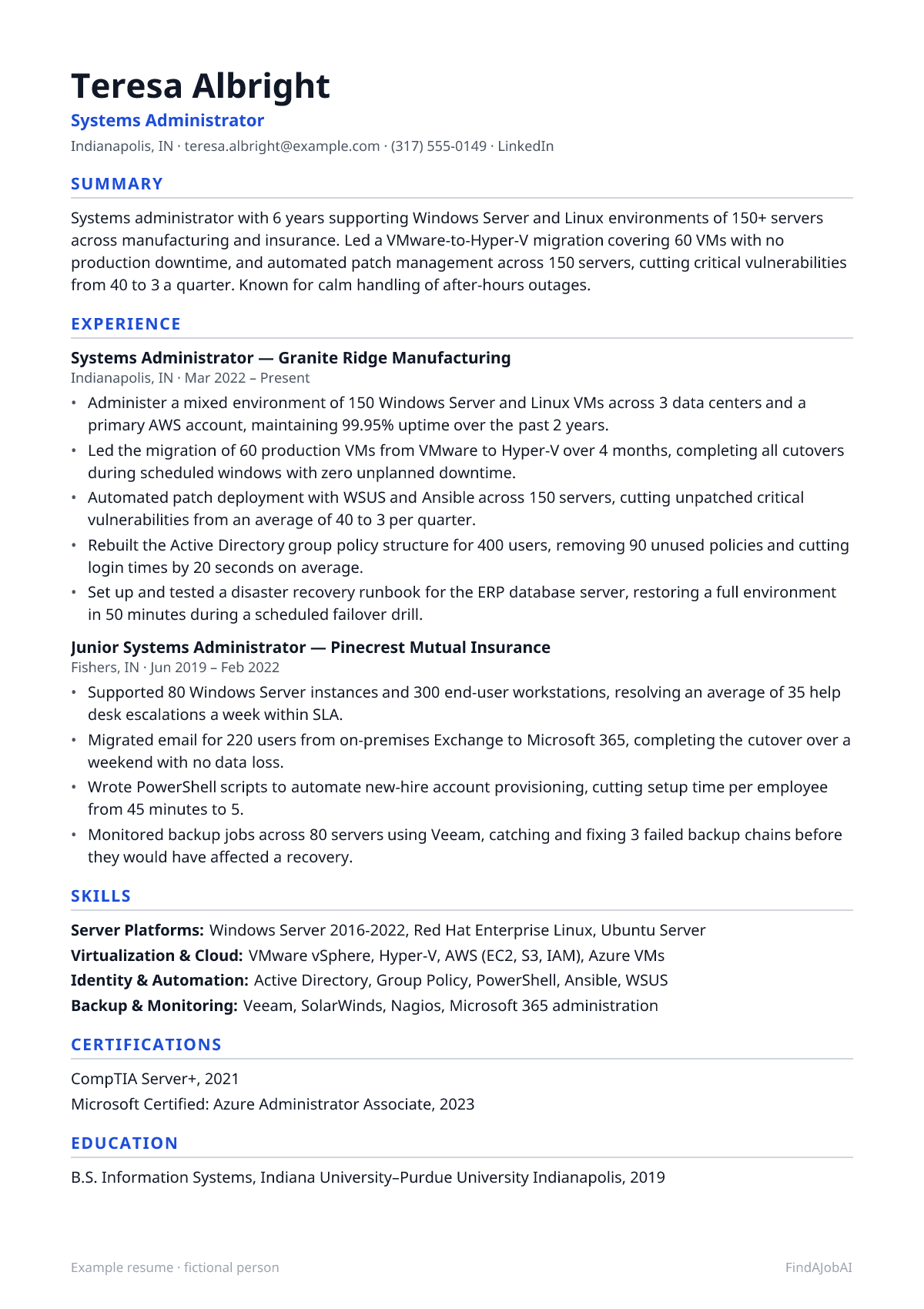
Systems Administrator resume template
This example as a one-page template: one column, standard headings and plain text, the format applicant tracking systems read most reliably.
After you sign up, Create my CV builds your own resume in this same one-column layout, from your real experience.
Mid-level systems administrator resume example
A complete one-page example for a fictional systems administrator: every bullet pairs an action with what changed because of it.
Example resume · fictional person
Teresa Albright
Systems Administrator
Indianapolis, IN · [email protected] · (317) 555-0149 · LinkedIn
Summary
Systems administrator with 6 years supporting Windows Server and Linux environments of 150+ servers across manufacturing and insurance. Led a VMware-to-Hyper-V migration covering 60 VMs with no production downtime, and automated patch management across 150 servers, cutting critical vulnerabilities from 40 to 3 a quarter. Known for calm handling of after-hours outages.
Experience
Systems Administrator, Granite Ridge Manufacturing
Indianapolis, IN · Mar 2022 – Present
- Administer a mixed environment of 150 Windows Server and Linux VMs across 3 data centers and a primary AWS account, maintaining 99.95% uptime over the past 2 years.
- Led the migration of 60 production VMs from VMware to Hyper-V over 4 months, completing all cutovers during scheduled windows with zero unplanned downtime.
- Automated patch deployment with WSUS and Ansible across 150 servers, cutting unpatched critical vulnerabilities from an average of 40 to 3 per quarter.
- Rebuilt the Active Directory group policy structure for 400 users, removing 90 unused policies and cutting login times by 20 seconds on average.
- Set up and tested a disaster recovery runbook for the ERP database server, restoring a full environment in 50 minutes during a scheduled failover drill.
Junior Systems Administrator, Pinecrest Mutual Insurance
Fishers, IN · Jun 2019 – Feb 2022
- Supported 80 Windows Server instances and 300 end-user workstations, resolving an average of 35 help desk escalations a week within SLA.
- Migrated email for 220 users from on-premises Exchange to Microsoft 365, completing the cutover over a weekend with no data loss.
- Wrote PowerShell scripts to automate new-hire account provisioning, cutting setup time per employee from 45 minutes to 5.
- Monitored backup jobs across 80 servers using Veeam, catching and fixing 3 failed backup chains before they would have affected a recovery.
Skills
- Server Platforms: Windows Server 2016-2022, Red Hat Enterprise Linux, Ubuntu Server
- Virtualization & Cloud: VMware vSphere, Hyper-V, AWS (EC2, S3, IAM), Azure VMs
- Identity & Automation: Active Directory, Group Policy, PowerShell, Ansible, WSUS
- Backup & Monitoring: Veeam, SolarWinds, Nagios, Microsoft 365 administration
Certifications
- CompTIA Server+, 2021
- Microsoft Certified: Azure Administrator Associate, 2023
Education
- B.S. Information Systems, Indiana University–Purdue University Indianapolis, 2019
Fictional example by the FindAJobAI team: the person, employers and numbers are invented. Keep the structure; use your own work and numbers you can explain in an interview.
Entry-level systems administrator resume example
A help desk technician moving into systems administration with a Server+ certification and a home lab instead of production experience. Education and certs sit early, and the lab project stands in for a real AD environment, described with a specific configuration task rather than a vague "learned servers" line.
Entry-level example resume · fictional person
Summary
Entry-level systems administrator with CompTIA Server+ and 18 months of help desk experience supporting Windows Server and Active Directory for 300 users. Built a home lab running Active Directory, DNS and a file server on Hyper-V with group policy for 3 simulated departments. Looking for a first dedicated systems administration role.
Experience
Help Desk Technician II, Oakwell County Government
Richmond, VA · Jul 2024 – Present
- Escalation point for 4 other technicians on Active Directory account lockouts and shared drive permission issues across 300 users.
- Rebuilt 25 stale group policy objects flagged during an internal review, resolving a login delay affecting 3 departments.
- Documented server room rack layout and cabling for 2 server closets, cutting technician time spent locating equipment during outages.
IT Support Intern, Commonwealth Credit Union
Richmond, VA · Jan 2023 – May 2023
- Assisted with Windows Server patch testing on 10 non-production VMs before monthly patch deployment to branch servers.
- Shadowed the systems team during a backup restore test, documenting the 8-step recovery process for a shared file server.
Skills
- Server Platforms: Windows Server 2019/2022, Ubuntu Server (basic)
- Identity & Networking: Active Directory, DNS, DHCP, Group Policy basics
- Virtualization & Tools: Hyper-V, VirtualBox, PowerShell basics, Remote Desktop
Certifications
- CompTIA Server+, 2024
- CompTIA A+, 2022
Projects
- Home lab Active Directory environment (Hyper-V, Windows Server 2022): built a domain with DNS, DHCP and group policy for 3 simulated departments, and configured a file server with role-based share permissions.
- Linux web server setup (Ubuntu Server, Nginx): deployed and hardened a basic web server, configuring UFW firewall rules and automated security updates.
Education
- A.A.S. Information Technology, J. Sargeant Reynolds Community College, 2024
Senior systems administrator resume example
A senior sysadmin eleven years in, now leading a small team and owning disaster recovery. The bullets shift from configuring individual servers to setting standards, running a cloud migration and cutting incident recovery time, with the summary naming the server count and team size.
Senior example resume · fictional person
Patricia Oyelaran
Senior Systems Administrator
Minneapolis, MN · [email protected] · (612) 555-0183 · LinkedIn
Summary
Senior systems administrator with 11 years running infrastructure for a healthcare technology company, overseeing 400 servers and leading a team of 3. Owns the disaster recovery program, led a full data center migration to AWS affecting 180 VMs, and cut mean time to recovery for major incidents by 70%.
Experience
Senior Systems Administrator, Meridian Health Systems
Minneapolis, MN · Feb 2020 – Present
- Lead a team of 3 administrators managing 400 Windows Server and Linux instances supporting clinical and billing applications for 2,500 employees.
- Directed the migration of 180 on-premises VMs to AWS over 10 months, sequencing cutovers by application dependency with no HIPAA-covered downtime incidents.
- Built and tested a disaster recovery program across 3 facilities, cutting mean time to recovery for major incidents from 4 hours to 70 minutes.
- Standardized server build automation with Ansible and Packer, cutting new server provisioning time from 2 days to under an hour.
- Led the response to a ransomware attempt that encrypted 2 file shares, restoring from backup within the 1-hour recovery target and leading the post-incident hardening review.
Systems Administrator, Birchwood Financial Partners
Minneapolis, MN · Aug 2016 – Jan 2020
- Managed 220 Windows Server VMs and the VMware vSphere cluster hosting them, maintaining 99.97% uptime over 3 years.
- Migrated the company's Exchange environment to Microsoft 365 for 650 users, completing cutover over a single weekend with no data loss.
- Mentored 2 junior administrators on PowerShell scripting and Active Directory administration, reducing their escalations to senior staff by half.
Junior Systems Administrator, Birchwood Financial Partners
Minneapolis, MN · Jun 2014 – Jul 2016
- Supported 150 end-user workstations and file servers, resolving an average of 40 help desk tickets a week within SLA.
- Automated nightly backup verification for 30 servers using PowerShell, catching 5 silent backup failures in the first year.
Skills
- Server Platforms: Windows Server, Red Hat Enterprise Linux, Ubuntu Server
- Virtualization & Cloud: VMware vSphere, AWS (EC2, S3, RDS, IAM), Azure VMs, Packer
- Automation & Identity: Ansible, PowerShell, Active Directory, Group Policy, Azure AD
- Leadership: Disaster recovery planning, incident command, mentoring, vendor and compliance coordination
Certifications
- Microsoft Certified: Azure Administrator Associate, 2021
- CompTIA Security+, 2017
Education
- B.S. Computer Science, University of Minnesota, 2014
How to write a systems administrator resume
Five steps, in the order a recruiter reads the page. The format around them stays plain for every job: one column, standard headings, newest role first.
Header: name, target title and links
Use the title “Systems Administrator” even if yours was IT Administrator or Infrastructure Specialist, and lead with your top certification (Server+, Security+, Azure/AWS associate) since many ATS filters and recruiters search for them directly.
Summary: what you do and your best proof
Name your core platforms (Windows Server, specific Linux distro, VMware, AWS or Azure), the scale you've managed in servers or users, and one concrete result: a migration completed, vulnerabilities cut, or uptime held through a specific event. Skip lines like “detail-oriented team player”; every sysadmin resume claims that.
Experience: newest first, a result in every bullet
Open each bullet with the scope (how many servers, VMs or users), then the action and the result: what you migrated, automated or fixed, and what changed because of it. A list of duties like "managed backups" says little; one restore drill that hit its recovery target says a lot.
Skills: grouped, in the ad's words
Group them into server platforms, virtualization or cloud, identity and automation, and backup or monitoring, naming the specific vendor tools you've used rather than generic terms. Give certifications a separate line high on the page, because many postings screen on them.
Education and certifications
List your degree or associate's program with the year, and put certifications (Server+, Security+, Azure Administrator, AWS SysOps) in a dedicated certifications line. Without full-time sysadmin experience, add a Projects section with a home lab AD environment or Linux server setup that names a specific configuration task.
Skills to put on a systems administrator resume
Hard skills are the tools and methods of the job; soft skills are how you work with people. Each comes with one way to prove it, because a skill named only in a list counts for little. Add the ones you really have.
Hard skills
- Windows Server administration
- Name the version and a bullet where you configured roles, applied patches or fixed an issue, with the server or user count affected.
- Linux administration
- Name the distro and show a configuration, hardening or troubleshooting task you handled in production, not just coursework.
- Active Directory
- Describe a specific AD change (group policy cleanup, OU restructure, account provisioning) and the user count or time it affected.
- Virtualization (VMware, Hyper-V)
- Name the platform and describe a migration or cluster you managed, with the VM count and downtime outcome.
- Cloud platforms (AWS, Azure)
- Point to a specific migration or workload you moved to the cloud, with the server or VM count involved.
- PowerShell / scripting
- Describe a manual task you automated and the time it saved per occurrence.
- Ansible or similar automation
- Name what you standardized (patching, provisioning) and the server count it now covers.
- Backup and disaster recovery (Veeam, etc.)
- Describe a backup or DR test you ran, with the recovery time achieved or a failure you caught.
- Patch management (WSUS, SCCM)
- Give the server count covered and a vulnerability metric before and after you owned the process.
- Monitoring (SolarWinds, Nagios)
- Describe an alert you set up and an incident it let you catch before users noticed.
- Microsoft 365 / Exchange administration
- Describe a migration or mailbox management task, with the user count and any downtime avoided.
Soft skills
- Incident response under pressure
- Give one outage or security incident you resolved after hours, with the time to resolution.
- Documentation habits
- Point to a runbook or wiki you wrote and how it reduced ramp-up time or repeat questions.
- Change management discipline
- Mention a change window or approval process you followed and an outage it helped avoid.
- Cross-team coordination
- Name the teams you coordinated with for a migration or cutover and how many users were affected.
- Mentoring
- Count the junior staff you trained and the skill they picked up, like scripting or AD basics.
- Risk awareness
- Describe a vulnerability, misconfiguration or failed backup you caught before it caused a bigger problem.
Systems Administrator resume bullet examples: weak vs strong
The same work, written two ways. The strong version names the tool, the scope and a result; the numbers are examples, yours must be real.
Weak: Managed servers.
Strong: Administered a mixed environment of 150 Windows Server and Linux VMs across 3 data centers, maintaining 99.95% uptime over 2 years.
Names the platform, scale and a concrete uptime figure.
Weak: Responsible for patching.
Strong: Automated patch deployment with WSUS and Ansible across 150 servers, cutting unpatched critical vulnerabilities from 40 to 3 a quarter.
Turns a routine duty into a measurable security improvement.
Weak: Worked on server migrations.
Strong: Led the migration of 60 production VMs from VMware to Hyper-V over 4 months with zero unplanned downtime.
Shows project ownership, scale and a clean execution result.
Weak: Managed Active Directory.
Strong: Rebuilt the Active Directory group policy structure for 400 users, removing 90 unused policies and cutting login times by 20 seconds.
Gives a specific AD cleanup with a user-facing performance result.
Weak: Handled backups.
Strong: Monitored backup jobs across 80 servers with Veeam, catching 3 failed backup chains before they would have affected a recovery.
Shows backup diligence through a near-miss caught early.
15 more systems administrator resume bullet examples
Grouped by area of the job, so you can find the ones closest to your work. Keep the shape (action, scope, result) and replace the invented numbers with your own.
Uptime and incident response
- Resolved a failed RAID array on a production file server within 90 minutes using a hot spare, avoiding data loss for 200 users.
- Diagnosed a memory leak in a legacy application causing weekly server crashes, applying a scheduled restart fix while a permanent patch was developed.
- Led incident response for a ransomware attempt on 2 file shares, restoring from backup within a 1-hour recovery target.
- Built an on-call runbook covering the 10 most common server and AD issues, cutting average after-hours resolution time by half.
Migrations and upgrades
- Migrated 45 legacy Windows Server 2012 instances to Windows Server 2022, completing all upgrades before end-of-life support cutoff.
- Moved 90 VMs from an aging VMware cluster to a new Hyper-V environment, cutting licensing costs by $18,000 a year.
- Migrated file shares for 500 users to SharePoint Online, reducing on-premises storage needs by 60%.
- Upgraded Active Directory functional level across 3 domain controllers with no authentication downtime during business hours.
Automation and patching
- Automated nightly server health checks with PowerShell across 120 servers, catching 8 disk space issues before they caused outages.
- Standardized patch deployment with WSUS across 150 servers, cutting unpatched critical vulnerabilities from 35 to 4 a quarter.
- Wrote Ansible playbooks for new server provisioning, cutting setup time from a full day to 45 minutes per server.
- Built a PowerShell script to automate new-hire AD account creation and group assignment, reducing onboarding IT time from 40 to 8 minutes.
Security and compliance
- Closed 60 inactive AD accounts flagged in a security audit, removing a common entry point for credential-based attacks.
- Implemented multi-factor authentication for 400 users accessing VPN and email, meeting a new cyber insurance requirement.
- Ran quarterly backup restore tests across 50 servers, confirming recovery objectives and catching 2 corrupted backup jobs before they were needed.
Systems Administrator resume summary examples
Two or three lines on what you do and your strongest proof. Start from the one closest to your level and use your own facts.
Systems administrator with a Server+ certification and 18 months as a help desk technician supporting Windows Server and Active Directory for 300 users. Built a home lab running Active Directory, DNS and a file server on Hyper-V. Ready for a first dedicated sysadmin role.
Systems administrator with 6 years across manufacturing and insurance, managing 150+ Windows Server and Linux VMs. Led a 60-VM VMware-to-Hyper-V migration with zero downtime and automated patching that cut critical vulnerabilities from 40 to 3 a quarter.
Senior systems administrator with 11 years running infrastructure for a healthcare technology company, overseeing 400 servers and a team of 3. Owns the disaster recovery program, led a full data center migration to AWS, and cut mean time to recovery for major incidents by 70%.
Common systems administrator resume mistakes
Each one is easy to make and quick to fix before you apply.
Listing platforms with no task attached
Windows Server, AD and VMware in Skills show familiarity; the bullets need to show what you did with them. Pair each with a migration, fix or automation project.
No mention of environment scale
"Managed the servers" could mean 5 or 500. State the number of servers, VMs or users you were responsible for.
Hiding disaster recovery and incident work
Backup tests and outage response are often the most convincing part of a sysadmin resume. Name one incident or drill, the recovery time, and what it proved.
Certifications dropped at the end
Server+, Security+ and cloud associate certs often decide whether an ATS passes a resume. Give them a clearly labeled line instead of a passing mention.
ATS tips for a systems administrator resume
Applicant tracking systems turn your file into text that recruiters search, mostly for the skills and titles in the ad. They rarely reject a resume on their own; one that parses badly or misses the ad's words just doesn't come up.
- Name the platforms you run (Windows Server version, specific Linux distro, VMware, Hyper-V); ads usually ask for specific ones.
- Give the scale of what you manage: number of servers, VMs or users, not just "the infrastructure."
- Describe at least one migration or major change you led, with its downtime (or lack of it) stated directly.
- Mention automation (PowerShell, Ansible, scripts) with what manual task it replaced and the time saved.
For the format itself, run the free ATS resume checklist.
Everything for Systems Administrators
- Systems Administrator cover letter examplesThree example letters and a short email version
- Systems Administrator interview questions30 questions with sample answers
- Systems Administrator job descriptionDuties, skills and requirements
- How to tailor your resume without lying
Other resume examples
Systems Administrator resume FAQ
What's the difference between a systems administrator and a network engineer resume?
A sysadmin resume centers on servers, operating systems, Active Directory, backups and the applications running on top of them. A network engineer resume centers on routing, switching and the connectivity between sites. Many roles overlap, so emphasize whichever side made up more of your actual work.
How do I get a systems administrator job with no professional experience?
Count help desk or IT support work that touched servers, AD or backups, and be specific about what you configured. A home lab running Active Directory, DNS and a file server on Hyper-V or VirtualBox also counts as real evidence of hands-on skill.
Should I list both Windows and Linux if I'm stronger in one?
List both if you've genuinely worked with each, but put your stronger platform first and show it with a bullet, not just in Skills. Don't claim deep Linux experience from a single course if the role needs production-level comfort with it.
How we built this page
The FindAJobAI team wrote the three example resumes, the bullets, the skills and the advice for systems administrator roles. The people, employers and numbers in the examples are invented; the structure, the tools and the way each bullet is built are the parts to copy.
Once we track enough live systems administrator job ads, this page also shows the skills they ask for most, counted the same way as our in-demand skills report.
Last reviewed on November 1, 2026.